
Android PDF EBook Reader1 - Google Play
You'll be able to see results in few seconds.
Publisher Description
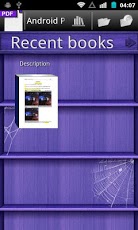
Read your PDF files here directly for free. With this tool, you can forget carrying your bulky books with you! Just download some PDF files into your Android and you can read them via this reader.SUPPORTS:Supply us with a bookshelfRecent books fast availableGet PDF files from your Android deviceInbuilt OPDS browser HOW TO VIEW PDF EBOOK?1. Open this app and you can get a bookshelf.2. You can press the arrow to get all groups, such as recent books, search results and PDF and so on.3. You can pick up one PDF file from your Android SD card here to read directly.4. In the process of reading a PDF eBook, you can choose to add bookmark, find text and zoom in MNEU key.5. Also you can choose to find books by name with MENU key here. WARNING:1. Starting with version 1.5, PDF and FB2 fonts are no longer embedded in the application. Standard Android fonts are used instead. If you wish to restore legacy fonts or install custom fonts, please use font package installers from Google Play Market.2. This free app is based on EBook Droid, which is an open source document viewer for Android.3. One way to think about this standard is as a kind of 'OPML for eBooks' - only instead of RSS feeds, OPDS features a catalog of eBooks, including optional links to book covers and short summaries. This free app Android PDF EBook Reader is not only a simple PDF reader. You can read other eBooks here. Come to explore this app. ###PLEASE READ HERE BEFORE YOU DOWNLOAD###1. Our ads partners may add some notification ads or icon ads in this app for finance support.2. Do you have any ideas, wishes or proposals for improvement? Please help us to make this app even better! Send us an email!3. Try to deactivate this app in ¡°DEVICE ADMINSTRTION¡± of ¡°LOCATION & SECURITY¡± if you want to uninstall it. PDF could be a file format used to represent documents in a manner independent of application software, hardware, and operating systems. Each PDF file may encapsulate a complete description of a fixed-layout flat document, including the text, fonts, graphics, and other information needed to display it.
About Android PDF EBook Reader
The company that develops Android PDF EBook Reader is Blue Video Maker Inc. The latest version released by its developer is 1.
To install Android PDF EBook Reader on your Android device, just click the green Continue To App button above to start the installation process. The app is listed on our website since 2013-05-31 and was downloaded 0 times. We have already checked if the download link is safe, however for your own protection we recommend that you scan the downloaded app with your antivirus. Your antivirus may detect the Android PDF EBook Reader as malware as malware if the download link to com.Android_PDF_EBook_Reader_20520 is broken.
How to install Android PDF EBook Reader on your Android device:
- Click on the Continue To App button on our website. This will redirect you to Google Play.
- Once the Android PDF EBook Reader is shown in the Google Play listing of your Android device, you can start its download and installation. Tap on the Install button located below the search bar and to the right of the app icon.
- A pop-up window with the permissions required by Android PDF EBook Reader will be shown. Click on Accept to continue the process.
- Android PDF EBook Reader will be downloaded onto your device, displaying a progress. Once the download completes, the installation will start and you'll get a notification after the installation is finished.
Program Details
System requirements
Download information
Pricing
Version History
version 1
posted on 2013-05-31
version 1
posted on 2013-05-31
Several fixes and updates
Disclaimer
Official Google Play Link
We do not host Android PDF EBook Reader on our servers. We did not scan it for viruses, adware, spyware or other type of malware. This app is hosted by Google and passed their terms and conditions to be listed there. We recommend caution when installing it.
The Google Play link for Android PDF EBook Reader is provided to you by apps112.com without any warranties, representations or guarantees of any kind, so access it at your own risk.
If you have questions regarding this particular app contact the publisher directly. For questions about the functionalities of apps112.com contact us.
